OurFamilyWizard Co-Parent App
- 4.5
- Rating
- 500.00K
- Installs
- Free
- Price

 Analysis by App-foxy
Co-parenting can become difficult for reasons that have little to do with willingness. A school message gets lost in a busy chat, a handover time is remembered differently, or an important expense becomes an argument because nobody can find the original agreement. I found OurFamilyWizard most useful when I treated it less like another messaging app and more like a shared place for keeping parenting details organized.
This is a parenting app from OurFamilyWizard, LLC, designed for separated or divorced parents who need a more structured way to coordinate. It is free to install, carries an Everyone age rating, and has been available since July 10, 2012. The current version is 2026.2.1 and requires at least OS 10. Those details matter because this is not a short-term family organizer aimed at casual planning; it is an established co-parenting tool with a specific audience.
My overall impression is positive, but conditional. Its value comes from reducing confusion, not from making an uncomfortable relationship comfortable. If both parents are prepared to use one shared system consistently, it can bring useful order to calendars, messages, and day-to-day decisions. If one parent refuses to participate, or if you only need an occasional reminder about pickup, a simpler calendar or messaging app may be the better choice.
You May Also Like

 Blood Strike: 2.5 Anniversary
Blood Strike’s Loadouts Turn Every Drop Into a Tactical Gamble
A close look at Blood Strike’s custom loadouts: how fast access to signature weapons reshapes its battle royale rhythm, rewards preparation, and narrows the gap between fights.

 Pandora - Music & Podcasts
Pandora’s Music Is Easy to Start, but Harder to Recover
Pandora’s strength is its low-effort path from a seed to a station. Its weak spot is how much confidence it asks you to place in connection, setup, and quiet recovery.

 8 Ball Pool
 Is Built on Rivalries, Rematches, and Routine
A close look at the rivalries, rematches, shared routines, and unanswered safety questions that turn a quick pool match into a persistent mobile community.

 Samsung Music
’s Quiet Strength Is Playing What You Already Own
Its reach comes less from spectacle than from dependable access to a personal library. That simplicity is both the app’s strongest retention engine and its ceiling.

 AccuWeather: Weather Radar
AccuWeather Review: A Quick, Clear Forecast for Everyday Decisions
For everyday plans, the best forecast is the one you can understand quickly. AccuWeather makes rain timing, radar, and local conditions easy to act on, with a few trade-offs.

 Hill Climb Racing
Why Hill Climb Racing Still Turns Crashes Into One More Run
A tiny car, a bumpy hill and one more upgrade: Hill Climb Racing keeps resurfacing because its simple chaos makes every near-miss feel personal.
More From Our News Desk



How the app fits into real co-parenting
The first thing I would clarify is the role this app plays. It is not simply a private notes app for one parent, and it is not just a colorful family calendar. Its purpose is to give both sides a common workspace for parenting communication. That distinction changes how useful it becomes: the app works best when the people involved agree that important information should be recorded there rather than scattered across text messages, email, paper notes, and memory.
In everyday use, I would see it helping with the recurring details that create friction. A parent can check the agreed schedule before making plans, review a previous message instead of relying on recollection, and keep child-related information in one place. The benefit is not that every disagreement disappears. The benefit is that fewer disagreements depend on “I thought you said” or “I never received that.”
That makes the app particularly relevant when communication is tense but still possible. A normal chat thread encourages quick replies, emotional reactions, and unrelated conversation mixed together. A dedicated co-parenting environment creates a stronger boundary around the subject. I found that boundary valuable because it encourages me to ask: what does the other parent need to know, what decision is required, and what information should remain available later?
What the free access really means
The app itself is free to download, which makes trying the basic experience less risky than committing immediately to a paid family-management service. However, the presence of in-app purchases ranging from $149.99 to $299.88 per item means “free” should not be interpreted as a promise that every useful part of the service costs nothing. The exact purchase that applies to a particular family can depend on how the service is set up, so I would check the current purchase screen carefully before relying on it for a long-term arrangement.
That distinction is important for budgeting. A parent may be able to install the app and explore it without paying at once, but a serious co-parenting arrangement should be evaluated against the possible paid commitment rather than the download price alone. I would also discuss the cost with the other parent before making the app the official communication channel. A shared system is much less useful if one person expects a paid plan and the other assumes the whole experience is permanently free.
I like that the entry point is accessible, but I would not call the app inexpensive simply because it has a free download. The listed purchase range is substantial, so the value question depends on the problems it solves. For a family dealing with repeated scheduling confusion, difficult documentation, or a large amount of child-related coordination, the cost may be easier to justify. For parents who communicate smoothly through an existing calendar and occasional messages, it may feel excessive.
Where the organization pays off
The strongest practical advantage is centralization. Instead of searching through several conversations, I can approach the app with a specific task: check the schedule, review a detail, send a focused message, or look back at what was decided. That workflow is especially helpful during busy weeks when school activities, appointments, travel, and changes to routine arrive close together.
A useful habit is to write messages as if another calm adult may need to understand them later. I would put the date, the child-related issue, the requested action, and a clear deadline in the same message. That is more effective than sending several short updates that leave the other parent to reconstruct the situation. The app cannot make a vague message precise, but its dedicated setting makes it easier to build a better habit.
Another non-obvious strength is the separation between immediate conversation and long-term reference. In ordinary texting, an important agreement can disappear under a stream of photos, jokes, and unrelated notifications. With a co-parenting app, I can deliberately treat some information as a record to consult later. That changes how I handle recurring arrangements: instead of renegotiating the same point every week, I can refer back to the established plan and discuss only what has changed.
This is also where the app can reduce emotional workload. When I am unsure about a handover or expense, I do not have to start a fresh debate from memory. I can first review the existing information, then ask a narrower question. That small pause is valuable. It encourages problem-solving rather than a reaction to incomplete recollection.
A realistic week with the app
Imagine a child has a school event on a day that normally belongs to the other parent. The event time changes the usual pickup, and the child also needs a specific item brought to school. In a standard messaging app, the conversation might become a chain of separate messages: one about the event, another about transport, and a later reminder about the item. A week later, the timing may be difficult to reconstruct.
With OurFamilyWizard, I would put the proposed change in one focused exchange, identify who is handling each part, and check the schedule before assuming the change is accepted. After the event, the same record gives both parents a clearer reference for what happened. The app does not decide the arrangement for them, and it does not guarantee agreement, but it can make the practical steps visible.
The same approach works for a medical appointment or an activity that affects several handovers. I would avoid using the platform as a place to unload every frustration. Its usefulness rises when I keep the message connected to the child’s needs and the decision that must be made. That is a behavioral advantage rather than a flashy feature, but it is one of the reasons a specialized tool can outperform a general chat app.
Tradeoffs that deserve attention before committing
Before choosing a shared system, I would look beyond the download and ask what routine both parents can realistically maintain. The main tradeoff is not simply whether a structured space is useful, but whether its added discipline earns its place in your family’s day-to-day coordination. That question also shapes what I would watch for as the app continues to evolve.
It adds structure, and structure can feel heavy
The very formality that helps some families can annoy others. If both parents already exchange clear messages and maintain a shared calendar, moving every detail into a dedicated platform may feel like extra administration. You have to remember to open the app, check it, and keep the information current. A tool that is ignored is less useful than a simple system both parents actually follow.
There is also a learning curve in changing communication habits. People who are accustomed to sending quick texts may find a focused co-parenting workflow slower at first. I consider that friction worthwhile when the alternative is repeated confusion, but it is still friction. Before choosing the app, I would ask whether both parents are genuinely willing to use it, not merely whether one parent likes the idea.
It cannot solve cooperation problems
This is the most important limitation. The app can organize communication, but it cannot force a response, create trust, or settle a disagreement by itself. If the underlying issue is that one parent regularly ignores messages or refuses reasonable coordination, a better interface will not remove that problem. It may make the lack of communication easier to identify, but that is different from fixing it.
Likewise, the platform should not be treated as a substitute for professional advice in complicated legal, financial, or safety situations. I would use it to keep parenting communication clearer, while seeking appropriate human help for matters that require legal interpretation, mediation, counseling, or urgent protection. Its role is practical coordination, not a replacement for those services.
Cost needs a deliberate decision
The free download is a useful starting point, but the in-app purchase range means families should examine the financial commitment before building every routine around the service. I would compare the likely paid value with the cost of simpler alternatives already available to me. A shared calendar, a carefully named email thread, and a mutually agreed document may cover basic scheduling for parents who cooperate well.
That comparison is not an argument against the app. It is a reminder that specialized structure has a price. The purchase makes more sense when it replaces several unreliable systems or reduces a recurring source of conflict. It makes less sense when the only need is a monthly reminder or a single shared appointment.
Privacy and emotional boundaries still depend on the user
A dedicated space can encourage better boundaries, but I would still be careful about what I write and how I write it. I would keep messages factual, child-focused, and limited to information relevant to parenting. I would avoid turning the record into a running argument or filling it with accusations that do not help resolve the immediate issue.
This is one of the app’s less obvious trade-offs: better documentation can be useful, but it can also tempt people to document every irritation. The healthiest workflow is selective. Record decisions, changes, requests, and relevant practical information. Do not confuse a complete parenting record with a transcript of every emotional reaction.
Who is most likely to get real value?
I would recommend trying it first to parents whose schedules change often, whose communication is frequently misunderstood, or who need a consistent place to coordinate school, appointments, activities, and handovers. It is also a strong candidate when both adults want a neutral routine for communication but find ordinary texting too informal or chaotic.
It may be especially helpful for parents living separately with different household routines. When a child moves between homes, small details can easily be missed: a change in school timing, a required item, or an adjustment to the next exchange. A shared system gives those details a better chance of being seen and revisited.
Professionals who support separated families may also find the app relevant as a tool to recommend when clients need more organized co-parenting communication. I would still want the adults using it to understand its limits and agree on how quickly they will check messages. The app can provide a common channel, but the family still needs practical rules around that channel.
I would skip it, at least initially, if both parents already coordinate reliably with a shared calendar and ordinary messages. I would also hesitate if one parent is unlikely to install or use it, because the central benefit depends on shared participation. Finally, if the situation involves immediate danger or communication that cannot safely occur directly, I would prioritize appropriate professional support rather than assuming a parenting app is the right first step.
How it compares with familiar alternatives
Compared with text messaging, the app offers a more focused environment for co-parenting. Texts are fast and familiar, but they mix important plans with everything else and can be difficult to review. OurFamilyWizard is slower only in the sense that it asks users to be intentional. For families with frequent misunderstandings, that extra structure can be an advantage.
Compared with email, it is better suited to repeated parenting coordination because the purpose is narrower. Email can be useful for longer explanations and attachments, but inboxes are easy to neglect, and unrelated work or personal messages compete for attention. A dedicated parenting space keeps the subject clearer.
Compared with a shared calendar, it addresses more than dates. A calendar is excellent for seeing when something happens, but it does not by itself explain who is responsible, what changed, or what practical details were agreed. I would use a calendar alone for simple arrangements and consider this app when scheduling and communication problems overlap.
Compared with a paper notebook, it is easier to consult while moving between homes and less vulnerable to being left in the wrong household. Paper can still work for families with very simple routines, but it becomes awkward when plans change frequently or both parents need the same information at different times.
Small habits that improve the experience
My first tip is to establish one rule before using the app: decide which types of information belong there. For example, schedule changes, school logistics, appointments, and child-related requests should go into the shared system, while casual conversation can remain elsewhere if both parents agree. Without that boundary, the app can become either overloaded or ignored.
My second tip is to separate a request from a complaint. If I need a response, I state the action clearly and give the relevant date. If I need to raise a broader relationship issue, I do not hide it inside a pickup message. This keeps urgent child-related decisions from being buried under emotional discussion.
My third tip is to review the next few days before sending a proposed change. A request that looks reasonable in isolation may conflict with school, travel, or another appointment already recorded. Checking the wider schedule first reduces unnecessary back-and-forth and makes the app function as a planning tool rather than merely a place to react.
My fourth tip is to avoid duplicate systems unless there is a clear reason. If one parent records changes in the app while the other continues using texts, the family ends up with two competing versions of events. I would agree on which channel is authoritative for parenting plans and use the other only for genuinely urgent contact or matters outside the shared workflow.
My verdict on the purchase decision
OurFamilyWizard has a clear purpose and, in my experience, a meaningful advantage when co-parenting communication needs more order than ordinary messaging can provide. Its free installation lowers the barrier to exploring the service, while the listed in-app purchases require a serious look at long-term value. I would not choose it because it sounds official or because a dedicated app automatically makes communication better. I would choose it when the family has a specific coordination problem that structure can realistically improve.
The app is worth considering for parents who are willing to participate, need a dependable shared reference, and regularly deal with schedule changes or misunderstood details. It is not the right answer for every family, especially when a simple shared calendar already works or when cooperation is not possible. In those cases, the added process and potential cost may not deliver enough benefit.
For me, the deciding question is simple: will both parents use this as the agreed home for important parenting information? If the answer is yes, the app can turn scattered conversations into a more manageable routine. If the answer is no, I would skip the commitment and choose the simplest system that both people will actually maintain. That makes this a useful specialist tool, not a universal replacement for communication.
The app has earned a 4.5 average from around 13 thousand ratings, with more than 500 thousand installs, which suggests that many families and professionals have found a reason to keep it in their toolkit. I would treat that popularity as a reason to investigate, not as a guarantee that it fits my situation. The best result comes from matching its structured approach to a real co-parenting need.
FAQs for OurFamilyWizard Co-Parent App
01What is the primary purpose of the OurFamilyWizard Co-Parent App?
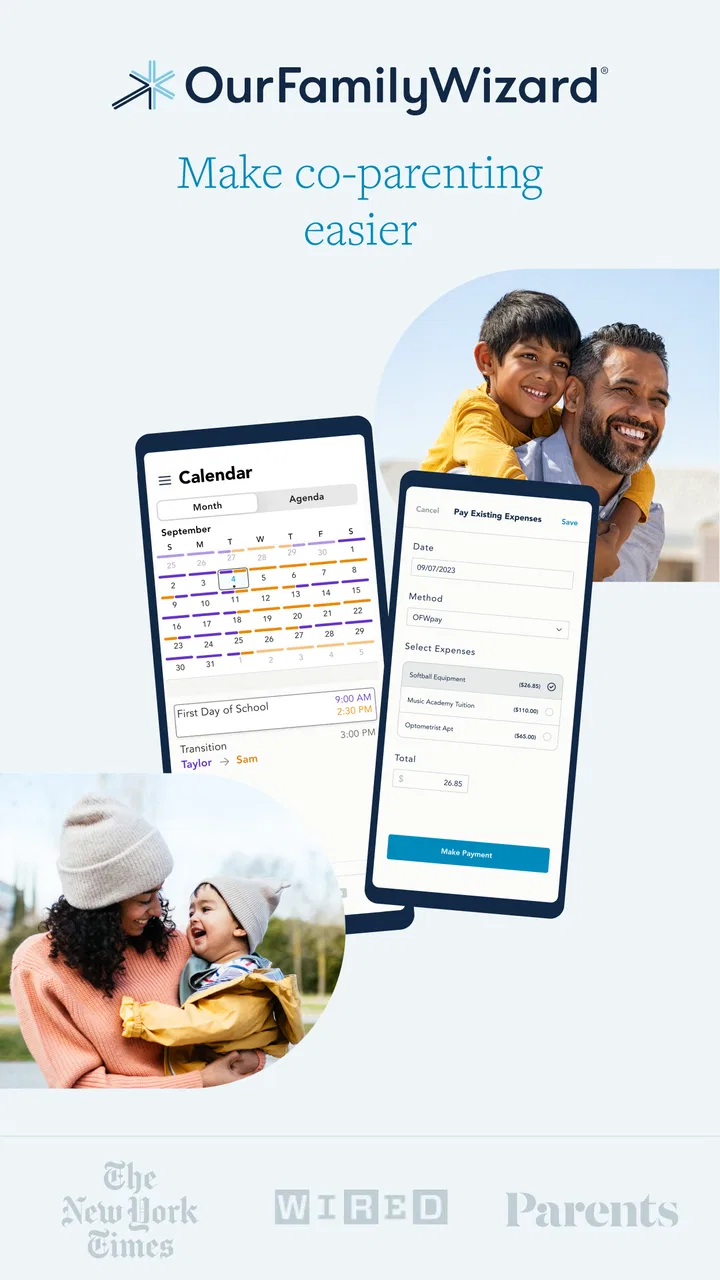
The OurFamilyWizard Co-Parent App is designed to facilitate communication and coordination between co-parents. It provides tools such as shared calendars, messaging, and expense tracking to help manage parenting schedules and responsibilities. The app aims to reduce conflict and improve the overall co-parenting experience by offering a neutral platform for interaction.
02Is the OurFamilyWizard app secure and private?
Yes, the OurFamilyWizard app prioritizes security and privacy. It uses encryption to protect user data and ensures that all communications between co-parents are secure. Additionally, the app complies with legal standards for data protection, providing parents with peace of mind regarding their personal information and communications.
03What features does the OurFamilyWizard app offer to improve co-parenting?
The app includes a variety of features such as a shared calendar for scheduling, an expense log for tracking shared financial responsibilities, and a secure messaging system. It also provides space for storing important documents and offers tools for managing custody arrangements, making it a comprehensive solution for co-parenting needs.
04Can third parties, like lawyers or therapists, access the OurFamilyWizard app?
Yes, the OurFamilyWizard app allows third parties such as lawyers, therapists, or mediators to access the system with the user's permission. This feature enables these professionals to monitor communication, provide support, and ensure that interactions remain constructive and in the best interest of the children involved.
05Is the OurFamilyWizard app available on both Android and iOS devices?
The OurFamilyWizard Co-Parent App is available on both Android and iOS platforms. Users can download it from the Google Play Store or the Apple App Store. The app is designed to be user-friendly on both operating systems, ensuring that all co-parents can benefit from its features regardless of their device preference.
Pros
- User-friendly interface simplifies navigation.
- Shared calendar syncs schedules effortlessly.
- Secure messaging ensures private communication.
- Expense tracking helps manage shared costs.
- Journal feature keeps detailed parenting notes.
Cons
- Subscription cost may be a barrier for some.
- Limited offline functionality can be inconvenient.
- Occasional syncing issues with certain devices.
- Requires mutual agreement for optimal use.
- Some features may be overwhelming initially.

OurFamilyWizard Co-Parent App
Gallery